Google Cloud Security: Complete GCP Hardening Guide for 2026
On this page
Why GCP Security Requires a Different Approach
Google Cloud Platform has a fundamentally different security model than AWS. GCP uses resource hierarchy (Organization → Folders → Projects) with inherited IAM policies and default encryption on everything.
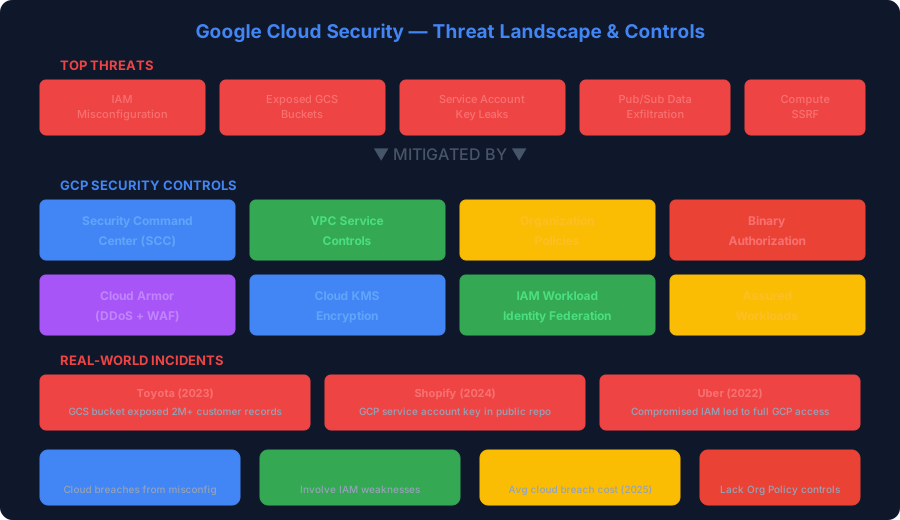
Despite strong defaults, GCP breaches are rising. The 2025 Mandiant M-Trends Report found that 37% of cloud breaches started with misconfigurations, and GCP-specific incidents increased 45% year-over-year.
1. GCP IAM: Resource Hierarchy and Bindings
Unlike AWS (user-centric IAM), GCP IAM is resource-centric — permissions are granted on resources via role bindings.
Principle of Least Privilege with Custom Roles
# Create a custom role with minimal permissions
gcloud iam roles create appReadOnly \
  --project=my-project \
  --title="App Read Only" \
  --description="Read-only access to app resources" \
  --permissions=storage.objects.get,storage.objects.list,logging.logEntries.list \
  --stage=GA

# Bind to a service account (not a user)
gcloud projects add-iam-policy-binding my-project \
  --member="serviceAccount:app-sa@my-project.iam.gserviceaccount.com" \
  --role="projects/my-project/roles/appReadOnly" \
  --condition='expression=request.time < timestamp("2026-12-31T00:00:00Z"),title=temp-access'
Service Account Security
Service account key leaks are the #1 GCP attack vector:
# List all SA keys (look for user-managed keys)
gcloud iam service-accounts keys list \
  --iam-account=my-sa@my-project.iam.gserviceaccount.com \
  --managed-by=user

# BEST: Use Workload Identity Federation instead of keys
gcloud iam workload-identity-pools create github-pool \
  --project=my-project \
  --location=global \
  --display-name="GitHub Actions Pool"

gcloud iam workload-identity-pools providers create-oidc github-provider \
  --project=my-project \
  --location=global \
  --workload-identity-pool=github-pool \
  --display-name="GitHub Provider" \
  --attribute-mapping="google.subject=assertion.sub,attribute.repository=assertion.repository" \
  --issuer-uri="https://token.actions.githubusercontent.com"
Organization Policy Constraints
# Disable SA key creation org-wide
gcloud org-policies set-policy \
  --organization=123456789 \
  policy.yaml

# policy.yaml
# constraint: constraints/iam.disableServiceAccountKeyCreation
# booleanPolicy:
#   enforced: true

# Restrict which external IP ranges can access resources
gcloud org-policies set-policy \
  --organization=123456789 \
  ip-policy.yaml

# Require OS Login for all VMs
gcloud compute project-info add-metadata \
  --metadata enable-oslogin=TRUE
2. VPC Service Controls: The GCP Secret Weapon
VPC Service Controls create a security perimeter around GCP resources that prevents data exfiltration — even with valid IAM credentials.
# Create an access policy
gcloud access-context-manager policies create \
  --organization=123456789 \
  --title="Production Security Policy"

# Create an access level (IP + device requirements)
gcloud access-context-manager levels create corp-network \
  --title="Corporate Network" \
  --basic-level-spec=level-spec.yaml \
  --policy=POLICY_ID

# Create a service perimeter
gcloud access-context-manager perimeters create production \
  --title="Production Perimeter" \
  --resources="projects/12345,projects/67890" \
  --restricted-services="storage.googleapis.com,bigquery.googleapis.com" \
  --access-levels="accessPolicies/POLICY_ID/accessLevels/corp-network" \
  --policy=POLICY_ID
What VPC SC prevents:
- Service account key stolen → can't exfil data outside perimeter
- Insider threat → BigQuery exports blocked outside perimeter
- Compromised CI/CD → GCS access blocked from non-approved networks
3. Security Command Center (SCC)
SCC is GCP's CSPM — think of it as AWS Security Hub + GuardDuty combined.
Enable SCC Premium Tier
# Enable SCC Premium (org-level)
gcloud scc manage services update security-health-analytics \
  --organization=123456789 \
  --enablement-state=ENABLED

# Enable all detectors
gcloud scc manage services update web-security-scanner \
  --organization=123456789 \
  --enablement-state=ENABLED

gcloud scc manage services update event-threat-detection \
  --organization=123456789 \
  --enablement-state=ENABLED

gcloud scc manage services update container-threat-detection \
  --organization=123456789 \
  --enablement-state=ENABLED
Query SCC Findings
# List all HIGH/CRITICAL findings
gcloud scc findings list 123456789 \
  --source="-" \
  --filter='severity="HIGH" OR severity="CRITICAL"' \
  --format="table(finding.category, finding.severity, resource.name)"

# Find all public GCS buckets
gcloud scc findings list 123456789 \
  --source="-" \
  --filter='category="PUBLIC_BUCKET"'
4. Binary Authorization
Enforce that only signed, trusted container images run in GKE:
# Create an attestor
gcloud container binauthz attestors create prod-attestor \
  --attestation-authority-note=prod-note \
  --attestation-authority-note-project=my-project

# Create the Binary Authorization policy
gcloud container binauthz policy import policy.yaml

# policy.yaml:
# defaultAdmissionRule:
#   evaluationMode: REQUIRE_ATTESTATION
#   enforcementMode: ENFORCED_BLOCK_AND_AUDIT_LOG
#   requireAttestationsBy:
#     - projects/my-project/attestors/prod-attestor
# clusterAdmissionRules:
#   us-central1-a.prod-cluster:
#     evaluationMode: REQUIRE_ATTESTATION
#     enforcementMode: ENFORCED_BLOCK_AND_AUDIT_LOG
#     requireAttestationsBy:
#       - projects/my-project/attestors/prod-attestor
5. Cloud Armor: DDoS and WAF
# Create a security policy
gcloud compute security-policies create web-policy \
  --description="Production WAF policy"

# Block SQL injection
gcloud compute security-policies rules create 1000 \
  --security-policy=web-policy \
  --expression="evaluatePreconfiguredExpr('sqli-v33-stable')" \
  --action=deny-403 \
  --description="Block SQLi"

# Block XSS
gcloud compute security-policies rules create 1001 \
  --security-policy=web-policy \
  --expression="evaluatePreconfiguredExpr('xss-v33-stable')" \
  --action=deny-403 \
  --description="Block XSS"

# Rate limiting
gcloud compute security-policies rules create 2000 \
  --security-policy=web-policy \
  --src-ip-ranges="*" \
  --action=rate-based-ban \
  --rate-limit-threshold-count=100 \
  --rate-limit-threshold-interval-sec=60 \
  --ban-duration-sec=300 \
  --description="Rate limit: 100 req/min"

# Geo-blocking
gcloud compute security-policies rules create 3000 \
  --security-policy=web-policy \
  --expression="origin.region_code == 'CN' || origin.region_code == 'RU'" \
  --action=deny-403 \
  --description="Block traffic from CN/RU"
6. GCP Security Audit Script
import subprocess
import json

def gcp_security_audit(project_id):
    """Comprehensive GCP security audit"""
    findings = []

    # Check 1: Public GCS buckets
    result = subprocess.run(
        ['gsutil', 'ls', '-p', project_id],
        capture_output=True, text=True
    )
    buckets = result.stdout.strip().split('\n')

    for bucket in buckets:
        if bucket:
            iam = subprocess.run(
                ['gsutil', 'iam', 'get', bucket],
                capture_output=True, text=True
            )
            if 'allUsers' in iam.stdout or 'allAuthenticatedUsers' in iam.stdout:
                findings.append({
                    'severity': 'CRITICAL',
                    'resource': bucket,
                    'issue': 'Publicly accessible GCS bucket'
                })

    # Check 2: SA keys older than 90 days
    result = subprocess.run(
        ['gcloud', 'iam', 'service-accounts', 'list',
         '--project', project_id, '--format', 'json'],
        capture_output=True, text=True
    )
    service_accounts = json.loads(result.stdout)

    for sa in service_accounts:
        keys_result = subprocess.run(
            ['gcloud', 'iam', 'service-accounts', 'keys', 'list',
             '--iam-account', sa['email'],
             '--managed-by', 'user', '--format', 'json'],
            capture_output=True, text=True
        )
        keys = json.loads(keys_result.stdout)
        if keys:
            findings.append({
                'severity': 'HIGH',
                'resource': sa['email'],
                'issue': f'{len(keys)} user-managed SA keys found'
            })

    # Check 3: Default network exists
    result = subprocess.run(
        ['gcloud', 'compute', 'networks', 'list',
         '--project', project_id, '--format', 'json'],
        capture_output=True, text=True
    )
    networks = json.loads(result.stdout)
    for network in networks:
        if network['name'] == 'default':
            findings.append({
                'severity': 'MEDIUM',
                'resource': 'default-network',
                'issue': 'Default VPC network still exists'
            })

    return findings
GCP vs AWS Security: Key Differences
| Feature | GCP | AWS |
|---|---|---|
| IAM model | Resource-centric | User-centric |
| Default encryption | Always on (Google-managed) | Opt-in per service |
| Network isolation | VPC Service Controls | VPC + security groups |
| Container security | Binary Authorization | ECR image scanning |
| Threat detection | SCC + Chronicle | GuardDuty + Detective |
| Audit logging | Cloud Audit Logs (always on) | CloudTrail (must enable) |
| DDoS protection | Cloud Armor (included) | Shield (Standard free / Advanced paid) |
Key Takeaways
- VPC Service Controls are non-negotiable — they stop data exfiltration even with valid credentials
- Eliminate SA keys — use Workload Identity Federation for all CI/CD and cross-cloud access
- Organization Policies > individual project settings — enforce security at the org level
- Binary Authorization for GKE — prevent unauthorized container images from running
- SCC Premium is worth it — real-time threat detection, vulnerability scanning, and compliance monitoring in one dashboard
Scan your GCP infrastructure code with ShieldX — detect misconfigurations in Terraform, Deployment Manager, and Kubernetes manifests before deployment.
Published by SecureCodeReviews
This article is part of our original AI security and cybersecurity content library. We show publish and update dates, keep company and policy pages public, and update important guidance when material changes affect readers.
Need a cloud security review before rollout?
We review IAM, network exposure, storage security, deployment posture, and the misconfigurations that usually get missed in fast-moving teams.
Advertisement
Free Security Tools
Try our tools now
Expert Services
Get professional help
OWASP Top 10
Learn the top risks
Related Articles
Cloud Security Guide: AWS, Azure & GCP Misconfigurations 2025
Master cloud security with comprehensive guides on S3 bucket security, IAM policies, secrets management, and real breach case studies.
Cloud Security in 2025: Comprehensive Guide for AWS, Azure & GCP
Deep-dive into cloud security best practices across all three major providers. Covers IAM, network security, data encryption, compliance, and real-world misconfigurations that led to breaches.
How to Secure AI Agents: Identity & Access Management for Agentic AI
Machine identities now outnumber human identities 45:1. Learn how to implement IAM for AI agents — authentication, authorization, credential management, and delegation chains in multi-agent systems.