AWS Security Best Practices: The Complete 2026 Guide for Production Workloads
On this page
Why AWS Security Matters More Than Ever
AWS handles 33% of global cloud infrastructure as of 2026. With over 200 services and billions of API calls daily, misconfigurations are the #1 cause of cloud breaches — not zero-day exploits.
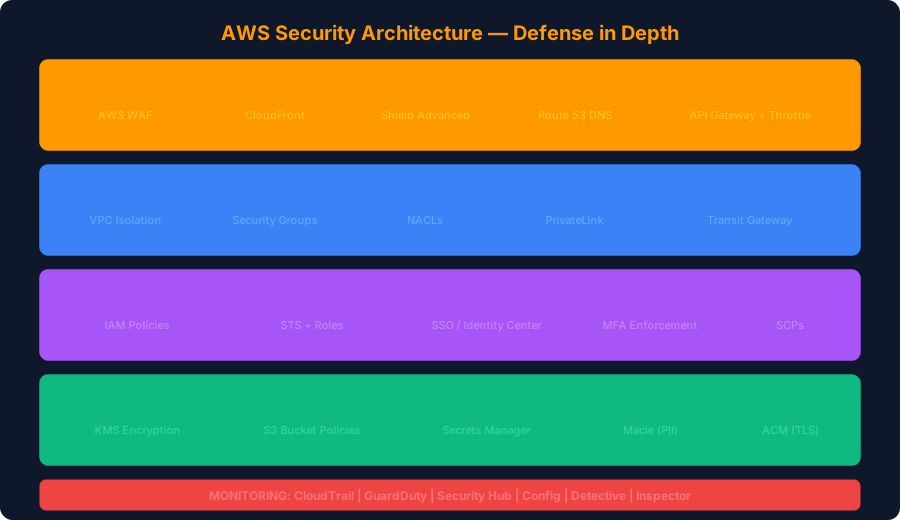
According to the 2025 Verizon DBIR, 82% of cloud breaches involved human error or misconfiguration. The average cost of an AWS breach reached $4.8M in 2025.
This guide covers every layer of AWS security — from perimeter to data — with production-ready code examples.
1. IAM: The Foundation of AWS Security
IAM misconfigurations are behind 76% of AWS security incidents. Here's how to lock it down:
Enforce Least Privilege
{
  "Version": "2012-10-17",
  "Statement": [
    {
      "Effect": "Allow",
      "Action": [
        "s3:GetObject",
        "s3:PutObject"
      ],
      "Resource": "arn:aws:s3:::my-app-bucket/uploads/*",
      "Condition": {
        "StringEquals": {
          "aws:PrincipalTag/team": "engineering"
        },
        "IpAddress": {
          "aws:SourceIp": "10.0.0.0/8"
        }
      }
    }
  ]
}
IAM Best Practices Checklist
| Practice | Priority | How to Check |
|---|---|---|
| No root account usage | CRITICAL | CloudTrail: filter root events |
| MFA on all IAM users | CRITICAL | aws iam get-credential-report |
| No long-lived access keys | HIGH | Access Analyzer unused access |
| Use IAM roles, not users | HIGH | Audit IAM user count |
| Permission boundaries | HIGH | Check PermissionsBoundary field |
| SCPs across organization | MEDIUM | AWS Organizations console |
| Regular access reviews | MEDIUM | IAM Access Analyzer |
Detect Overpermissive Policies with Access Analyzer
# Find all unused permissions in the last 90 days
aws accessanalyzer generate-finding \
  --analyzer-arn arn:aws:access-analyzer:us-east-1:123456789:analyzer/MyAnalyzer \
  --type UNUSED_ACCESS

# List external access findings
aws accessanalyzer list-findings \
  --analyzer-arn arn:aws:access-analyzer:us-east-1:123456789:analyzer/MyAnalyzer \
  --filter '{"status": {"eq": ["ACTIVE"]}}'
2. VPC Security: Network Isolation
Multi-Layer Network Architecture
# Terraform: Secure VPC with private subnets
resource "aws_vpc" "main" {
  cidr_block           = "10.0.0.0/16"
  enable_dns_hostnames = true
  enable_dns_support   = true

  tags = { Name = "production-vpc" }
}

# Private subnet — no direct internet access
resource "aws_subnet" "private" {
  vpc_id            = aws_vpc.main.id
  cidr_block        = "10.0.1.0/24"
  availability_zone = "us-east-1a"

  tags = { Name = "private-subnet" }
}

# Security group: Allow only specific traffic
resource "aws_security_group" "app" {
  name_prefix = "app-sg-"
  vpc_id      = aws_vpc.main.id

  ingress {
    from_port       = 443
    to_port         = 443
    protocol        = "tcp"
    security_groups = [aws_security_group.alb.id]
    description     = "HTTPS from ALB only"
  }

  egress {
    from_port   = 443
    to_port     = 443
    protocol    = "tcp"
    cidr_blocks = ["0.0.0.0/0"]
    description = "HTTPS outbound for API calls"
  }
}
VPC Flow Logs for Threat Detection
# Enable VPC Flow Logs to CloudWatch
aws ec2 create-flow-logs \
  --resource-type VPC \
  --resource-ids vpc-123abc \
  --traffic-type ALL \
  --log-destination-type cloud-watch-logs \
  --log-group-name /aws/vpc/flow-logs \
  --deliver-logs-permission-arn arn:aws:iam::role/flowlogsRole
3. Data Encryption: At Rest and In Transit
S3 Bucket Hardening
{
  "Version": "2012-10-17",
  "Statement": [
    {
      "Sid": "DenyUnencryptedUploads",
      "Effect": "Deny",
      "Principal": "*",
      "Action": "s3:PutObject",
      "Resource": "arn:aws:s3:::my-bucket/*",
      "Condition": {
        "StringNotEquals": {
          "s3:x-amz-server-side-encryption": "aws:kms"
        }
      }
    },
    {
      "Sid": "DenyHTTP",
      "Effect": "Deny",
      "Principal": "*",
      "Action": "s3:*",
      "Resource": [
        "arn:aws:s3:::my-bucket",
        "arn:aws:s3:::my-bucket/*"
      ],
      "Condition": {
        "Bool": {
          "aws:SecureTransport": "false"
        }
      }
    }
  ]
}
KMS Key Rotation
# Enable automatic key rotation (every 365 days)
aws kms enable-key-rotation --key-id alias/my-app-key

# Verify rotation status
aws kms get-key-rotation-status --key-id alias/my-app-key
4. Monitoring: GuardDuty, Security Hub, and CloudTrail
Enable GuardDuty Across All Regions
import boto3

def enable_guardduty_all_regions():
    ec2 = boto3.client('ec2')
    regions = [r['RegionName'] for r in ec2.describe_regions()['Regions']]

    for region in regions:
        gd = boto3.client('guardduty', region_name=region)
        try:
            gd.create_detector(
                Enable=True,
                DataSources={
                    'S3Logs': {'Enable': True},
                    'Kubernetes': {'AuditLogs': {'Enable': True}},
                    'MalwareProtection': {
                        'ScanEc2InstanceWithFindings': {
                            'EbsVolumes': {'Enable': True}
                        }
                    }
                }
            )
            print(f"GuardDuty enabled in {region}")
        except gd.exceptions.BadRequestException:
            print(f"GuardDuty already enabled in {region}")
Security Hub Compliance Dashboard
# Enable Security Hub with all standards
aws securityhub enable-security-hub \
  --enable-default-standards \
  --tags Purpose=compliance

# Enable CIS AWS Foundations Benchmark
aws securityhub batch-enable-standards \
  --standards-subscription-requests '[
    {"StandardsArn": "arn:aws:securityhub:::ruleset/cis-aws-foundations-benchmark/v/3.0.0"}
  ]'

# Get compliance summary
aws securityhub get-findings \
  --filters '{"ComplianceStatus": [{"Value": "FAILED", "Comparison": "EQUALS"}]}' \
  --max-items 10
5. Incident Response Automation
Auto-Remediate Public S3 Buckets
import boto3
import json

def lambda_handler(event, context):
    """Auto-remediate public S3 bucket access"""
    s3 = boto3.client('s3')

    # Get bucket name from Config event
    bucket = event['detail']['requestParameters']['bucketName']

    # Block all public access
    s3.put_public_access_block(
        Bucket=bucket,
        PublicAccessBlockConfiguration={
            'BlockPublicAcls': True,
            'IgnorePublicAcls': True,
            'BlockPublicPolicy': True,
            'RestrictPublicBuckets': True
        }
    )

    # Send SNS alert
    sns = boto3.client('sns')
    sns.publish(
        TopicArn='arn:aws:sns:us-east-1:123456789:security-alerts',
        Subject=f'PUBLIC S3 BUCKET REMEDIATED: {bucket}',
        Message=json.dumps({
            'bucket': bucket,
            'action': 'Blocked all public access',
            'severity': 'CRITICAL'
        })
    )

    return {'statusCode': 200, 'body': f'Remediated {bucket}'}
50-Point AWS Security Checklist
Identity & Access (15 points)
- Root account MFA enabled
- No root access keys exist
- All IAM users have MFA
- No inline IAM policies
- Permission boundaries on all roles
- SCPs enforced at organization level
- Regular credential rotation
- Access Analyzer enabled
- IAM roles prefer over IAM users
- Cross-account roles use external IDs
- No wildcard (*) permissions
- Unused credentials removed (90 days)
- SSO/Identity Center configured
- Conditions on all IAM policies
- Password policy enforced
Network (10 points)
- VPC Flow Logs enabled
- No public subnets for databases
- Security groups: no 0.0.0.0/0 ingress
- NACLs on all subnets
- PrivateLink for AWS service access
- WAF on all public endpoints
- Shield Advanced for DDoS
- DNS firewall configured
- Transit Gateway for multi-VPC
- Network Firewall for IDS/IPS
Data (10 points)
- S3 Block Public Access (account-level)
- All S3 buckets encrypted (KMS)
- EBS volumes encrypted
- RDS encrypted at rest + in transit
- KMS key rotation enabled
- Secrets in Secrets Manager (not env vars)
- Macie scanning S3 for PII
- SSL/TLS 1.2+ enforced everywhere
- S3 versioning + MFA delete
- Backup encryption enabled
Monitoring (10 points)
- CloudTrail in all regions
- CloudTrail log file validation
- GuardDuty enabled all regions
- Security Hub with CIS benchmark
- Config rules for compliance
- CloudWatch alarms for anomalies
- SNS alerts for security findings
- Detective for investigation
- Inspector for vulnerability scanning
- EventBridge for auto-remediation
Compute (5 points)
- SSM Session Manager (no SSH keys)
- EC2 IMDSv2 enforced
- Lambda functions in VPC
- ECS/EKS with non-root containers
- AMI scanning with Inspector
Key Takeaways
- IAM is everything — 76% of AWS breaches start with identity misconfiguration
- Automate remediation — Don't rely on humans to fix security findings at 2 AM
- Encrypt by default — Use KMS with automatic rotation on everything
- Monitor everything — GuardDuty + Security Hub + CloudTrail is the minimum viable monitoring
- Use SCPs — Organization-wide guardrails prevent entire classes of misconfiguration
Scan your cloud infrastructure code with ShieldX — detect IAM misconfigurations, exposed secrets, and compliance violations in Terraform, CloudFormation, and CDK before they reach production.
Published by SecureCodeReviews
This article is part of our original AI security and cybersecurity content library. We show publish and update dates, keep company and policy pages public, and update important guidance when material changes affect readers.
Planning an AI feature launch or security review?
We assess prompt injection paths, data leakage, tool use, access control, and unsafe AI workflows before they become production problems.
Advertisement
Free Security Tools
Try our tools now
Expert Services
Get professional help
OWASP Top 10
Learn the top risks
Related Articles
Cloud Security Guide: AWS, Azure & GCP Misconfigurations 2025
Master cloud security with comprehensive guides on S3 bucket security, IAM policies, secrets management, and real breach case studies.
Cloud Security in 2025: Comprehensive Guide for AWS, Azure & GCP
Deep-dive into cloud security best practices across all three major providers. Covers IAM, network security, data encryption, compliance, and real-world misconfigurations that led to breaches.
How to Secure AI Agents: Identity & Access Management for Agentic AI
Machine identities now outnumber human identities 45:1. Learn how to implement IAM for AI agents — authentication, authorization, credential management, and delegation chains in multi-agent systems.