Container Security: Docker & Kubernetes Hardening — Build, Ship, Run Securely
On this page
The Container Security Problem
Containers are ephemeral, portable, and fast — but they share the host kernel. One misconfiguration can give attackers full node access.
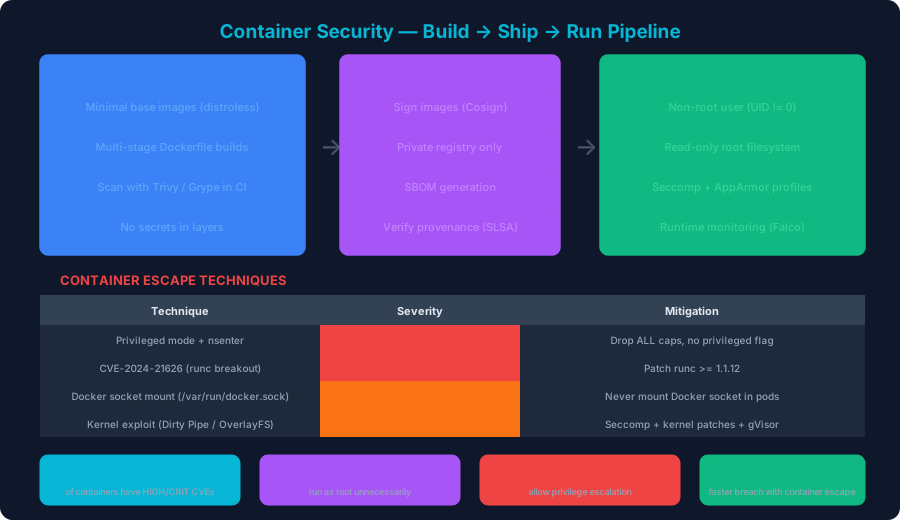
The 2025 Sysdig Cloud-Native Security Report found:
- 87% of container images have HIGH or CRITICAL CVEs
- 76% of containers run as root unnecessarily
- 52% allow privilege escalation
- The average container has 127 known vulnerabilities
Phase 1: BUILD — Secure Your Dockerfiles
Hardened Multi-Stage Dockerfile
# Stage 1: Build
FROM node:20-alpine AS builder
WORKDIR /app

# Copy only package files first (cache optimization)
COPY package*.json ./
RUN npm ci --only=production && npm cache clean --force

COPY . .
RUN npm run build

# Stage 2: Production — distroless
FROM gcr.io/distroless/nodejs20-debian12:nonroot

# Don't run as root
USER nonroot:nonroot
WORKDIR /app

# Copy only built artifacts
COPY --from=builder --chown=nonroot:nonroot /app/dist ./dist
COPY --from=builder --chown=nonroot:nonroot /app/node_modules ./node_modules

EXPOSE 8080

CMD ["dist/server.js"]
What this prevents:
- Build tools in production image (multi-stage)
- Running as root (USER nonroot)
- Shell access for attackers (distroless has no shell)
- Large attack surface (distroless = minimal packages)
Dockerfile Security Linting with Hadolint
# Run Hadolint on your Dockerfile
docker run --rm -i hadolint/hadolint < Dockerfile

# Common issues it catches:
# DL3007 - Using :latest tag
# DL3008 - Not pinning apt package versions
# DL3009 - Not cleaning apt cache
# DL3015 - Not using --no-install-recommends
# DL3018 - Not pinning apk package versions
# DL3025 - Using ADD instead of COPY
.dockerignore (Prevent Secret Leaks)
.git
.env
.env.*
*.pem
*.key
node_modules
.aws
.gcp
docker-compose*.yml
Phase 2: SHIP — Image Scanning and Signing
Scan with Trivy in CI/CD
# GitHub Actions: Trivy image scan
name: Container Security
on: push

jobs:
  scan:
    runs-on: ubuntu-latest
    steps:
      - uses: actions/checkout@v4

      - name: Build image
        run: docker build -t my-app:$GITHUB_SHA .

      - name: Trivy vulnerability scan
        uses: aquasecurity/trivy-action@master
        with:
          image-ref: my-app:$GITHUB_SHA
          format: sarif
          output: trivy-results.sarif
          severity: HIGH,CRITICAL
          exit-code: 1  # Fail build on HIGH/CRITICAL

      - name: Trivy config scan (Dockerfile)
        uses: aquasecurity/trivy-action@master
        with:
          scan-type: config
          scan-ref: .
          exit-code: 1

      - name: Upload SARIF
        uses: github/codeql-action/upload-sarif@v3
        with:
          sarif_file: trivy-results.sarif
Sign Images with Cosign (Supply Chain Security)
# Generate a key pair
cosign generate-key-pair

# Sign the image after build
cosign sign --key cosign.key my-registry/app:v1.2.3

# Verify before deployment
cosign verify --key cosign.pub my-registry/app:v1.2.3

# Keyless signing with OIDC (recommended)
COSIGN_EXPERIMENTAL=1 cosign sign my-registry/app:v1.2.3
# Uses Fulcio CA + Rekor transparency log
Generate SBOM (Software Bill of Materials)
# Generate SBOM with Syft
syft my-registry/app:v1.2.3 -o spdx-json > sbom.json

# Attach SBOM to image
cosign attach sbom --sbom sbom.json my-registry/app:v1.2.3

# Scan SBOM for vulnerabilities
grype sbom:sbom.json
Phase 3: RUN — Runtime Security
Container Escape Techniques and Prevention
Escape 1: Privileged Container + nsenter
# Attack: If privileged=true, escape is trivial
nsenter --target 1 --mount --uts --ipc --net --pid -- bash
# Now you have root on the host

# Prevention: Never allow privileged containers
# In Kubernetes:
# securityContext:
#   privileged: false
#   allowPrivilegeEscalation: false
#   capabilities:
#     drop: ["ALL"]
Escape 2: Docker Socket Mount
# Attack: If /var/run/docker.sock is mounted
docker -H unix:///var/run/docker.sock run -it --privileged \
  -v /:/host alpine chroot /host bash
# Full host access

# Prevention: Never mount Docker socket in pods
Escape 3: CVE-2024-21626 (runc Breakout)
# Attack: runc < 1.1.12 allows /proc/self/fd escape
# via WORKDIR pointing to leaked fd

# Prevention:
# 1. Patch runc >= 1.1.12
# 2. Use containerd >= 1.7.13
# 3. Use gVisor/Kata Containers for untrusted workloads
Seccomp Profile (System Call Filtering)
{
  "defaultAction": "SCMP_ACT_ERRNO",
  "architectures": ["SCMP_ARCH_X86_64"],
  "syscalls": [
    {
      "names": [
        "read", "write", "open", "close", "stat", "fstat",
        "mmap", "mprotect", "munmap", "brk", "ioctl",
        "access", "pipe", "select", "sched_yield",
        "dup", "dup2", "nanosleep", "getpid", "socket",
        "connect", "accept", "sendto", "recvfrom",
        "bind", "listen", "getsockname", "getpeername",
        "clone", "execve", "exit", "wait4", "kill",
        "fcntl", "flock", "fsync", "fdatasync",
        "getcwd", "chdir", "mkdir", "rmdir",
        "epoll_create", "epoll_wait", "epoll_ctl",
        "futex", "set_tid_address", "set_robust_list",
        "exit_group", "tgkill", "openat", "readlinkat",
        "newfstatat", "getrandom", "memfd_create",
        "clock_gettime", "clock_nanosleep"
      ],
      "action": "SCMP_ACT_ALLOW"
    }
  ]
}
Image Comparison: Base Image Attack Surface
| Base Image | Size | CVEs (typical) | Has Shell | Recommended |
|---|---|---|---|---|
| ubuntu:22.04 | 77MB | 30-50 | Yes | No |
| alpine:3.19 | 7.3MB | 5-15 | Yes | Development |
| distroless/static | 2.5MB | 0-3 | No | Go, Rust |
| distroless/base | 20MB | 2-8 | No | C/C++ |
| distroless/nodejs | 120MB | 5-15 | No | Node.js |
| scratch | 0MB | 0 | No | Static binaries |
| chainguard/node | 50MB | 0-5 | No | Best for Node |
Production Container Security Pipeline
# Complete GitHub Actions pipeline
name: Secure Container Pipeline
on:
  push:
    branches: [main]

jobs:
  build-scan-sign-deploy:
    runs-on: ubuntu-latest
    permissions:
      contents: read
      id-token: write  # For keyless signing
      security-events: write  # For SARIF upload

    steps:
      # 1. Lint Dockerfile
      - uses: hadolint/hadolint-action@v3
        with:
          dockerfile: Dockerfile
          failure-threshold: warning

      # 2. Build
      - name: Build image
        run: |
          docker build -t app:$GITHUB_SHA .

      # 3. Scan for vulnerabilities
      - name: Trivy scan
        uses: aquasecurity/trivy-action@master
        with:
          image-ref: app:$GITHUB_SHA
          exit-code: 1
          severity: CRITICAL

      # 4. Generate SBOM
      - name: Generate SBOM
        run: syft app:$GITHUB_SHA -o spdx-json > sbom.json

      # 5. Push to registry
      - name: Push
        run: |
          docker tag app:$GITHUB_SHA $REGISTRY/app:$GITHUB_SHA
          docker push $REGISTRY/app:$GITHUB_SHA

      # 6. Sign image (keyless)
      - name: Sign
        run: cosign sign $REGISTRY/app:$GITHUB_SHA

      # 7. Attach SBOM
      - name: Attach SBOM
        run: cosign attach sbom --sbom sbom.json $REGISTRY/app:$GITHUB_SHA

      # 8. Deploy (only signed images)
      - name: Deploy to K8s
        run: |
          kubectl set image deployment/app \
            app=$REGISTRY/app:$GITHUB_SHA@$(cosign triangulate $REGISTRY/app:$GITHUB_SHA)
Key Takeaways
- Multi-stage builds + distroless — reduce image size by 90% and eliminate most CVEs
- Scan in CI/CD, fail on CRITICAL — don't deploy images with known exploits
- Sign everything with Cosign — prevent supply chain attacks (remember SolarWinds)
- Never run as root — 76% of containers do this unnecessarily
- Seccomp + capability dropping — reduce kernel attack surface to only needed syscalls
- Runtime monitoring with Falco — catch container escapes and cryptomining in real time
Scan your Dockerfiles and container configurations with ShieldX — detect hardcoded secrets, root user vulnerabilities, and insecure base images before they reach production.
Published by SecureCodeReviews
This article is part of our original AI security and cybersecurity content library. We show publish and update dates, keep company and policy pages public, and update important guidance when material changes affect readers.
Planning an AI feature launch or security review?
We assess prompt injection paths, data leakage, tool use, access control, and unsafe AI workflows before they become production problems.
Advertisement
Free Security Tools
Try our tools now
Expert Services
Get professional help
OWASP Top 10
Learn the top risks
Related Articles
What Is a Supply Chain Attack? How It Happens, Causes, Recent Cases, Challenges, and Prevention
A practical guide to software supply chain attacks for engineering and security teams. Learn what a supply chain attack is, how it happens, why it keeps working, recent real-world incidents, the biggest challenges, and the precautions that reduce risk.
Container Security Best Practices for Production
Secure your containerized applications from image building to runtime with these battle-tested practices.
Cloud Security Guide: AWS, Azure & GCP Misconfigurations 2025
Master cloud security with comprehensive guides on S3 bucket security, IAM policies, secrets management, and real breach case studies.